Real-Time vs Batch Analytics: When Each Approach Fits Enterprise BI


Real-time vs batch analytics is a practical architecture decision, not a preference for faster dashboards. Enterprise BI teams usually need both: batch pipelines for governed, repeatable reporting and real-time pipelines for operational moments where late information changes the decision. The hard part is deciding where speed creates business value, where it only creates cost, and how to keep both patterns from producing conflicting versions of the same metric.
A sales leader watching pipeline movement during the last week of a quarter does not need the same data latency as a controller closing the monthly books. A fraud team scoring card transactions cannot wait for a nightly refresh. A finance team reconciling SAP BW, Salesforce, and Power BI reporting may prefer a clean batch window because the report must tie back to governed source balances. Those differences shape the architecture long before anyone chooses Kafka, Fabric Real-Time Intelligence, a warehouse job, or a Power BI refresh schedule.
What Real-Time and Batch Analytics Mean in Enterprise BI
Enterprise BI uses real-time and batch analytics to answer different timing questions, even when both approaches eventually feed the same dashboards.
Batch analytics processes a defined group of records on a schedule. The schedule might run every night, every hour, or after a financial close step finishes. The important point is that the data is collected, transformed, validated, and published as a deliberate unit of work. That makes batch processing a strong fit for reporting where consistency matters more than immediacy, such as revenue reporting, margin analysis, regulatory extracts, and historical trend dashboards.
Real-time analytics processes events as they arrive, or close enough to arrival that users can act before the business moment passes. In practice, many enterprise systems are near real time rather than literally instantaneous. Event streams, change data capture, operational telemetry, and push APIs move records through a pipeline continuously, often with seconds or minutes of latency. IBM describes real-time analytics around fresh data from sources such as IoT sensors, mobile apps, and financial platforms, with use cases including fraud detection, anomaly detection, demand forecasting, and intelligent automation.
The distinction is not only latency. Batch thinking assumes that a complete dataset can be gathered before analysis. Real-time thinking assumes that decisions must be made while the dataset is still changing. That shift affects validation, error handling, cost control, semantic modeling, and user expectations. A batch pipeline can pause, reconcile, and publish a corrected result before anyone sees it. A streaming pipeline often exposes bad source events quickly unless guardrails sit directly in the flow.
For background on adjacent pipeline design choices, see What Is a Data Pipeline: ETL, ELT, and How Analytics Gets Data.
Architecture Components Behind Real-Time and Batch BI
The architecture behind batch and real-time BI differs most in how data enters, waits, and becomes trusted enough for analysis.
Batch Analytics Architecture for Governed Reporting
A batch BI pipeline commonly starts with source extraction from an ERP, CRM, application database, SaaS API, or file drop. Data lands in a warehouse, lakehouse, or staging layer. Transformations then standardize keys, apply business rules, join reference data, and publish curated tables or semantic models for tools like Power BI. The pipeline has a clear beginning and end, so teams can test row counts, reconcile totals, and investigate failures before the refreshed dataset reaches business users.
This pattern remains dominant in enterprise reporting because many business questions are inherently periodic. Sales pipeline snapshots need consistent cutoff times. Finance dashboards need posted and approved transactions. HR reporting often depends on effective dates and payroll cycles. Batch windows also make source-system load easier to control, especially when the source is SAP BW, Salesforce, or another platform where unrestricted querying can affect operational users.
Real-Time Analytics Architecture for Operational Decisions
Real-time BI usually starts with events rather than periodic extracts. A customer clicks, a device sends telemetry, an order changes status, a Salesforce event fires, or a transaction enters a payment system. The event moves through a broker, stream processor, change data capture service, or platform-native real-time layer. Instead of waiting for a full refresh, the pipeline enriches and routes each event or small micro-batch into an operational store, lakehouse table, alerting system, or live dashboard.
The benefit is speed, but speed adds state management. A streaming pipeline must handle late-arriving events, duplicate messages, out-of-order records, schema changes, retry behavior, and replay. It also needs monitoring that detects both hard failures and silent lag. If the dashboard says inventory is current but the event processor is 11 minutes behind, the user sees a real-time interface with stale data. That is worse than a clearly labeled batch report because it encourages overconfidence.
Microsoft Fabric reflects this broader shift by separating classic Power BI refresh patterns from Real-Time Intelligence capabilities for streaming data. Microsoft documentation positions Fabric Real-Time Intelligence as a way to ingest, transform, query, and act on streaming data inside the Fabric ecosystem. At the same time, Power BI’s older real-time streaming semantic model path is scheduled for deprecation for new model creation after October 31, 2027, so BI architects should avoid designing new long-term architectures around that legacy pattern.
Tools and Methods for Batch, Streaming, and Hybrid Analytics
Tool choice should follow the latency and governance requirement, not the other way around.
Batch-heavy BI stacks often use warehouse jobs, lakehouse tables, dbt models, orchestration tools, native SaaS connectors, and scheduled semantic model refreshes. The operating model is familiar: extract data, transform it, validate it, publish it, and monitor the run. This is where incremental refresh in Power BI, warehouse partitioning, and data quality tests do most of their work. The team optimizes for reliable throughput and traceable numbers rather than event-by-event responsiveness.
Streaming and near-real-time stacks use a different set of components. Event hubs, Kafka-compatible services, change data capture, stream processing engines, materialized views, operational stores, and Fabric Real-Time Intelligence are common patterns. These tools are designed to keep data moving continuously, but they also require a stronger engineering discipline around observability and schema contracts. A failed nightly batch job is visible at the next refresh. A streaming pipeline can degrade gradually, fall behind, or keep running while emitting partial truth.
Many enterprise BI teams settle on a hybrid architecture. They keep the official historical record in batch-curated warehouse or lakehouse tables, then layer selected real-time signals where decisions genuinely depend on freshness. For example, an operations dashboard may show live order exceptions beside yesterday’s reconciled sales totals. The user gets current risk signals without pretending that every financial metric has passed the same validation path. That hybrid model is often more sustainable than forcing all reporting into a streaming architecture.
For a deeper Power BI storage-mode view, see Power BI Storage Modes: Import, DirectQuery, and Composite for Enterprise Models.
How Latency, Cost, and Use Case Fit Compare
A simple comparison helps separate the cases where real-time analytics is worth the operational cost from the cases where batch processing is the better BI foundation.
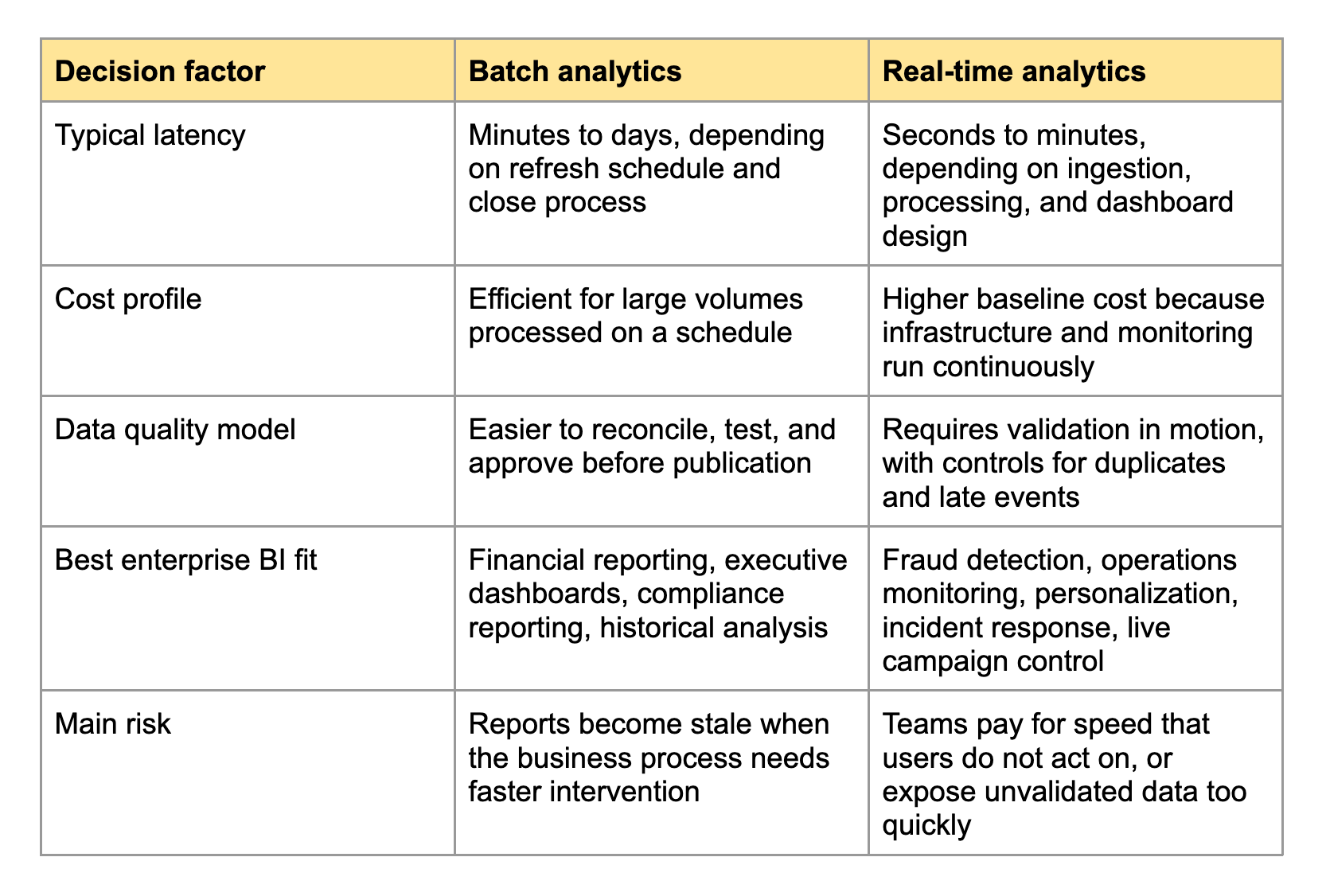
The table makes the decision look cleaner than it feels in production. Latency is rarely a single number. A pipeline can ingest data in seconds but still wait for dimensional enrichment, access-control checks, semantic model updates, or user-facing dashboard refreshes. Cost also includes people, not only compute. Stream processing often needs engineers who understand event ordering, replay, checkpointing, and incident response. Batch analytics has its own maintenance burden, but it is usually easier for BI teams to operate without around-the-clock pipeline ownership.
Context-Specific Usage in SAP, Salesforce, and Power BI Reporting
Enterprise systems change the real-time vs batch decision because each platform has its own reporting semantics, API limits, and operational expectations.
SAP reporting often favors controlled batch or scheduled near-real-time patterns. SAP BW, SAP S/4HANA analytics, and finance reporting depend on governed structures, business logic, and reconciliation. A CFO dashboard that combines FI/CO balances, cost centers, and profitability views is usually less valuable if it updates every few seconds but does not tie to the official close process. For SAP operational monitoring, near-real-time extraction can make sense, but finance and management reporting usually need traceability first.
Salesforce reporting has a different shape. Sales and RevOps teams often want faster visibility into pipeline movement, campaign response, and support escalation. Still, not every Salesforce dashboard needs a streaming architecture. Opportunity snapshots, territory reporting, and forecast rollups often benefit from scheduled extracts because the business wants consistent comparison periods. When teams do need fresher Salesforce data inside Power BI, a connector-based approach can reduce custom extraction work. The Power BI Connector for Salesforce, available on Salesforce AppExchange, is relevant in that context because it gives BI teams a structured path for Salesforce-to-Power BI reporting without building every data movement step from scratch.
Power BI adds another layer to the decision. Import mode works well for governed batch models, especially when incremental refresh is configured carefully. DirectQuery and composite models can reduce latency, but they shift performance pressure to the source and require tighter model design. Fabric expands the options with lakehouse, warehouse, Direct Lake, and real-time capabilities, yet the same rule remains: the model should match the decision cadence. A live dashboard that no one acts on until Monday morning is an expensive scheduled report in disguise.
Common Challenges When Enterprises Move Toward Real-Time BI
Real-time analytics introduces challenges that are easy to underestimate when the discussion starts with dashboard latency.
Metric Consistency Across Batch and Streaming Layers
The first challenge is metric consistency. A real-time revenue counter and a monthly finance report may both show sales, but they rarely define sales at the same point in the business process. One may count submitted orders. The other may count invoiced revenue after cancellations, taxes, currency conversion, and approvals. If the dashboard labels both as revenue without context, the organization gets a trust problem rather than a data problem.
Source System Load and API Limits
Real-time extraction can stress systems that were not designed for constant analytic polling. Salesforce APIs, SAP extractors, warehouse endpoints, and operational databases all have limits. Event-driven patterns reduce polling, but they require source events that contain the right fields at the right granularity. When those events are incomplete, teams often stitch real-time signals to batch reference data. That hybrid join is useful, but it needs explicit freshness labels so users know which parts of the report are live and which parts are curated.
Late Events, Duplicates, and Reprocessing
Streaming data arrives imperfectly. Events can be delayed, duplicated, corrected, or delivered out of order. A batch pipeline can often rebuild yesterday’s partition and republish a corrected result. A streaming pipeline needs rules for watermarking, idempotency, replay, and compensation. These are not exotic edge cases. They appear as soon as networks fail, mobile devices reconnect, APIs retry, or upstream applications change event contracts.
Operational Ownership and Incident Response
The final challenge is ownership. Batch BI failures are painful, but they usually align with scheduled runs and known reporting windows. Real-time systems create a continuous service obligation. Someone needs to know when lag crosses a threshold, when a stream processor falls behind, when a schema change breaks enrichment, and when a dashboard continues to refresh with partial data. Without that ownership model, the organization buys real-time infrastructure but keeps a batch-era support process.
Best Practices for Choosing the Right Analytics Pattern
The best architecture comes from matching data freshness to business action, then designing the pipeline around that requirement.
Define the Decision Window Before the Data Pipeline
Start by asking how quickly a user can act on the information. If the answer is seconds or minutes, real-time analytics may be justified. If the answer is hours, days, or a formal review cycle, batch analytics is likely enough. This question forces a useful conversation because it separates curiosity from action. Many teams ask for real-time dashboards because the phrase sounds modern, then admit that the actual decision happens in a daily standup or a weekly forecast meeting.
Use Batch as the System of Record When Accuracy Dominates
Keep batch-curated data as the system of record for metrics that require reconciliation, approvals, or historical restatement. Finance, compliance, executive KPIs, and board reporting usually belong here. A batch model can still refresh frequently, but it should preserve clear cutoff rules and lineage. Users need to know whether a number is preliminary, final, adjusted, or restated.
Add Real-Time Signals Where Intervention Changes the Outcome
Use real-time analytics where earlier intervention changes business results. Fraud scoring, service incident detection, inventory exceptions, machine downtime, and live campaign pacing fit this pattern. In these cases, a delayed metric can create direct cost. The goal is not a prettier dashboard. The goal is a shorter path from signal to action.
Label Freshness and Confidence Directly in BI Outputs
BI teams should expose freshness and confidence in the report itself. Show the latest event timestamp. Label reconciled metrics separately from live operational signals. Make lag visible. A dashboard that mixes batch and real-time data without freshness context asks users to guess how current each number is. In enterprise BI, that guesswork eventually becomes a governance issue.
Real-World Scenarios That Clarify the Decision
Concrete scenarios make the architecture choice easier than abstract latency targets.
Fraud Detection During Payment Authorization
A fraud team needs data while the transaction is still controllable. Real-time analytics can score the event, compare it with recent behavior, and trigger a hold, step-up authentication, or rejection before the loss occurs. Batch reporting still matters afterward for trend analysis and model evaluation, but it cannot replace the live decision path.
Monthly Financial Close Reporting
A finance team preparing close reporting needs consistency, approvals, and reconciliation more than second-by-second updates. The source transactions may change throughout the period, but the reporting process depends on defined cutoffs and controlled adjustments. Batch analytics fits because the report is a governed artifact. A real-time overlay may help monitor close progress, but the final numbers should come from the controlled process.
Sales Pipeline Monitoring Near Quarter End
Sales pipeline reporting often benefits from a hybrid model. Executives want fresh signals when large opportunities move late in the quarter, but they also need stable snapshots for forecast comparison. A practical architecture might stream key opportunity changes into an operational view while preserving scheduled pipeline snapshots for trend and forecast accuracy. That gives leaders early warning without weakening the historical record.
A practical Salesforce reporting comparison is available in Salesforce CRM Analytics vs Power BI for Salesforce Reporting.
How BI Architects Should Choose Between Batch and Real-Time Analytics
BI architects should choose the pattern by working backward from action, governance, and total operating cost.
If users cannot act before the next scheduled refresh, batch analytics is usually the right default. It is cheaper to operate, easier to validate, and better aligned with governed enterprise reporting. That does not make it old-fashioned. It makes it appropriate for metrics where the organization values accuracy, explainability, and stable comparisons. A well-designed batch model can refresh hourly, use incremental processing, and still deliver excellent BI performance without the complexity of a continuous event pipeline.
Real-time analytics earns its place when delay causes measurable damage or missed opportunity. The strongest cases have three traits: the source can emit reliable events, the business process can respond immediately, and the organization is willing to operate the pipeline as a live service. If any one of those traits is missing, the architecture often collapses into expensive theater. The dashboard looks current, but decisions still wait for meetings, reconciliations, or manual review.
The most durable enterprise pattern is usually hybrid. Keep the governed batch layer as the trusted record. Add real-time signals for exceptions, alerts, and operational intervention. Then make freshness, lineage, and metric definitions visible to users. Real-time vs batch analytics is not a contest where one approach replaces the other. It is a design choice about where the business needs speed, where it needs certainty, and where a BI team can responsibly support both.